Hardware:
- Toshiba Satellite A205-S5804 15.4-inch Laptop (Intel Pentium Dual Core T2330 Processor, 1 GB RAM, 120 GB Hard Drive, Vista Premium)
(but the computer type is irrelevant in this post)

Software:
- Windows XP with Service Pack 2
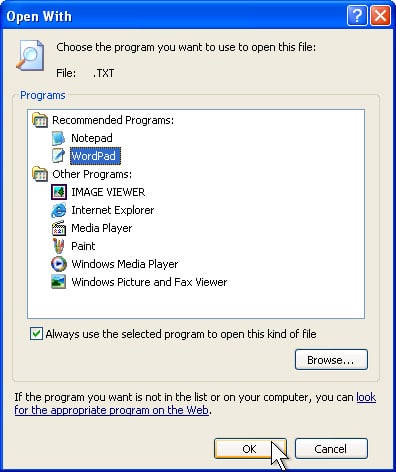
One of my guys had downloaded some malware or a virus that had messed up his registry so that whenever you tried to run an application you would always get the error:
Choose the program you want to use to open this file…
Running anti-virus programs does not fix registry issues so I searched around and found that Symantec has a tool they created to solve this problem called KillGodzilla, but you cannot run it by double-clicking and you cannot run it from the command line either. Figure that one out.
Finally, I ran the registry file listed in number 12 on Registry Edits for Windows XP “Tweaks and Tips”. From what I understand it merges the registry preferences in the file with the current registry. It would not run when I was logged in as administrator so I booted up in safe mode with networking and it ran, albeit with an error. I rebooted into the regular mode and this solved the problem though.
Amazon Associate Disclosure: As an Amazon Associate I earn from qualifying purchases. This means if you click on an affiliate link and purchase the item, I will receive an affiliate commission. The price of the item is the same whether it is an affiliate link or not. Regardless, I only recommend products or services I believe will add value to Share Your Repair readers. By using the affiliate links, you are helping support Share Your Repair, and I genuinely appreciate your support.